How hourly Minecraft server hosting works
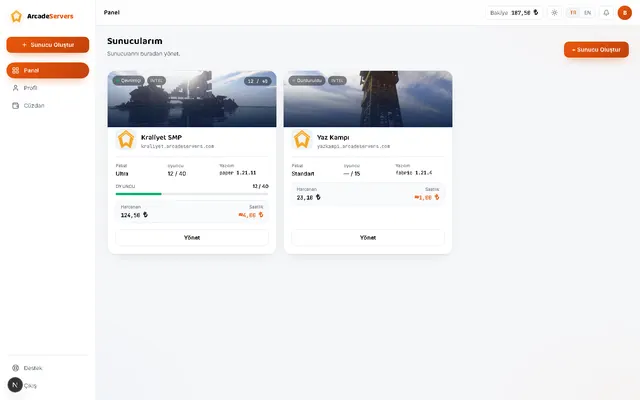
With classic hosting you pay a month up front and the meter runs whether your server is used or not. This model is different: you are charged only for the hours your server is actually ON. A group that plays a few evenings a week keeps the server off most of the month and pays far less.
Billing is per hour and a started hour counts in full. Open your server and close it ten minutes later and one hour is charged; leave it up for 61 minutes and two hours are. That removes the guesswork of per-minute metering — the panel shows what you will pay before you commit.
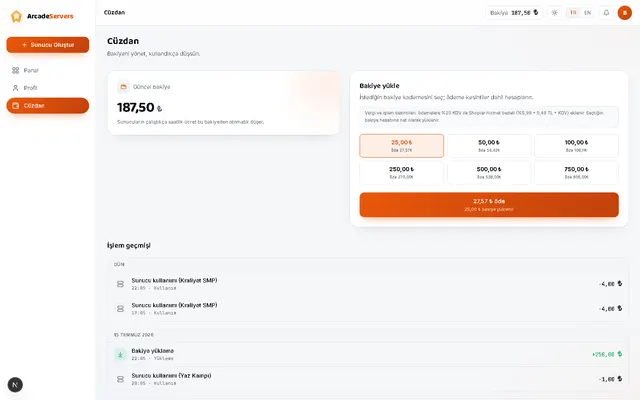
Payment runs through a prepaid wallet: top up any amount and the server draws from it while it runs. There is no auto-renewal, subscription or contract. If your balance runs out the server stops and your data stays where it is; top up and you pick up where you left off.
How much RAM do you need, and for how many players?
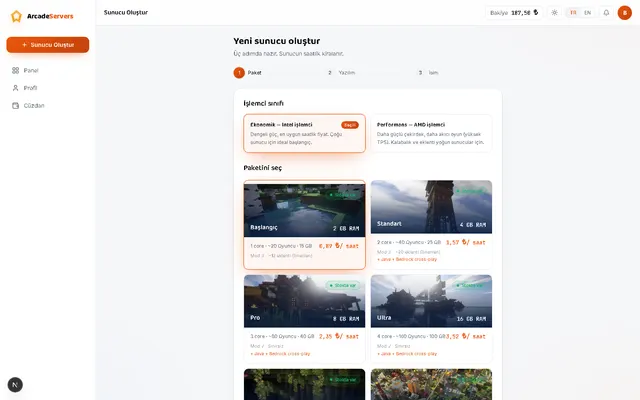
RAM decides how much world and how many players the server can hold in memory. Too little shows up as stutter (low TPS) as your player count grows. In practice 2 GB suits a vanilla world with a few friends; 4 GB a mid-sized community with a reasonable plugin set; 8 GB is the starting point for busy communities, heavy plugin stacks and modpacks.
Packages scale allocated cores and NVMe disk alongside RAM. Cores handle the per-tick work — player movement, mobs, redstone — and matter as much as RAM on crowded or contraption-heavy worlds. We do not sell the same core twice: the cores on the card are yours.
If none of the ready-made packages fit, you can build a custom configuration and pick RAM, cores and disk individually; pricing follows the resources you choose, transparently. Don't worry about picking wrong: stop the server and resize up or down, and your world stays exactly as it was.
Plugin and mod support: Paper, Fabric, Forge
The panel offers nine server software options: Paper, Purpur and Spigot on the plugin side; Fabric, Forge and NeoForge on the mod side. You can switch later too — stop the server and pick a different software.
You don't have to hunt for plugin files: search three separate sources from the store inside the panel and install with one click. Installed plugins also show up in the file manager if you'd rather edit them by hand.
Modpacks want noticeably more memory than plugins, so mod support unlocks from the 8 GB package upward. Smaller packages can run plugins but not mods — a deliberate limit that keeps your server from falling over the first time it fills up.
Java and Bedrock players on the same server
If part of your group plays on PC (Java) and part on a phone or the Windows 10/11 edition (Bedrock), you can switch on the cross-play bridge from the panel. Once it's up, both sides join the same world through the same address.
Cross-play is conditional and we'd rather say so up front: it needs a plugin-family server software (Paper and its relatives), Minecraft 1.20.5 or newer, and at least 4 GB of RAM. It is not available on the 2 GB starter package or on mod-based software. Game consoles (Xbox, PlayStation, Switch) are not supported. The panel tells you plainly when your server doesn't qualify.
The first ten minutes after your server starts
When the setup wizard finishes, your server is ready within a few minutes and the panel shows a connection address. Type that into Minecraft's "Add Server" screen and you're in — no port forwarding, no static IP, no leaving your own PC running.
Three things people usually do first: make themselves an operator (OP), whitelist their friends, and adjust world settings such as difficulty, game mode and spawn. All three are doable from the panel without editing files, and you can type commands straight into the live console.
Keeping your world safe: backups and File Protection
You reach your server's files directly from the panel: upload, download, edit and delete through the file manager, and take a manual backup whenever you like. That is part of the standard product.
Beyond that, File Protection keeps your world in cloud storage independent of the server machine — on for every server, free of charge, and it cannot be switched off. We take an automatic backup every day, and while your server runs a restore point is created about every half hour, so at worst you lose the last half hour. The only limit is your server's own disk space.
Stop anytime: idle charges and cancellation
You can stop your server with one click and billing stops at that moment. There is also a setting that puts the server to sleep when nobody is connected, and it is on by default — so a server you forgot to close doesn't quietly drain your balance. On paid packages you can switch that setting off from the panel, in which case your server stays up until you stop it.
A sleeping server counts as off: no hourly charge, your world is stored as it was, and it resumes where it left off when you start it again. Since there is no subscription there is nothing to "cancel" either — stopping the server is enough. Terms covering unused balance are set out in our refund policy.