
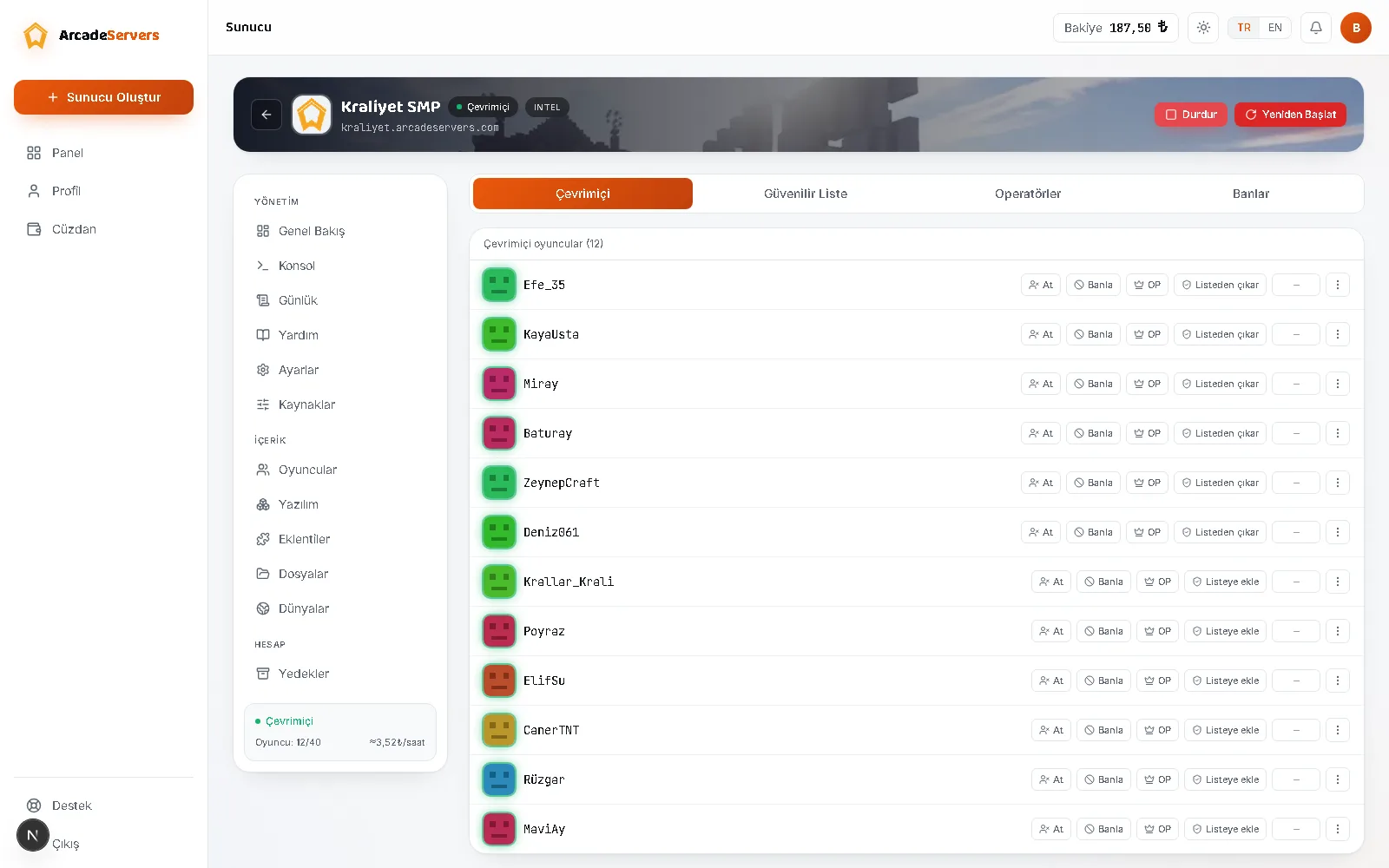
The Players section lets you run your server without memorising in-game commands. It has five tabs: Online, Whitelist, Operators, Bans and History.
Online
Shows connected players live, refreshing roughly every ten seconds. Row actions let you kick, ban, whitelist or make a player an operator, and they follow the player's state: an existing operator gets “Remove OP” instead of the OP button.
The three-dot menu at the end of a row applies a command to that player in one click: teleport, game mode, give item, effect, XP, clear inventory, message, set spawn. It runs through the server console, so the server must be running.
Ping is measured only on plugin-family software (Paper, Purpur, Spigot, CraftBukkit); on Vanilla, Fabric, Quilt, Forge and NeoForge it stays empty.
The list is empty while the server is off, and also once your server falls asleep after sitting idle — see how sleep mode works.
Whitelist
With the whitelist on, only players you have added can join — in small groups of friends, a simple and effective way to keep unwanted visitors out.
Type a name and press Add; removing is one click, and no restart is needed. But the list alone does nothing: unless you turn on Whitelist in Settings, the names have no effect and the server stays open to everyone.
With Enforce whitelist strictly on in Settings, a player you remove is disconnected as you remove them; with it off, the change only applies on their next login.
Operators (OP)
Players you grant operator rights can use server commands in game. It is a powerful permission — give it only to people you trust and take it back when it is no longer needed.
Operator permission level (1-4) in Settings decides how far that power reaches. The default is 4: everything, including command blocks and stopping the server.
For a finer structure (moderator, helper, player groups) you need a permissions plugin — see the plugin installation guide.
Bans
Banned players appear with the reason and date, and a mistaken ban is lifted from the same list. Kick and Ban open a reason box; the reason is optional, but the player sees whatever you write.
The difference between a name ban and an IP ban: a name ban blocks the person, an IP ban blocks that connection. You enter an IP ban in the Bans tab by typing the address yourself; the panel does not show players' IP addresses. An IP ban can affect others in the same household, so keep it as a last resort.
Bedrock players
If Bedrock cross-play is on, players joining from a phone or tablet have names starting with a dot (.Ahmet); Java names cannot contain a dot, so the two sides never collide. Cross-play players whose name cannot be resolved show as a “Cross-play player (name hidden)” row.
The panel's name fields do not accept a dot — only 3 to 16 letters, digits and underscores. To whitelist or ban a Bedrock player, use the Console section instead, for example whitelist add .Ahmet. Full setup: the cross-play article.
History
The fifth tab lists who joined, their total play time, how many connections they made and when they were last seen; the 200 players with the most time are shown, and the clock runs while someone is still inside. If the server is running but the list is empty, record collection may have only just reached that machine and will build on its own.
What still works while the server is off
Whitelisting, granting OP, banning and unbanning all work with the server stopped — the panel resolves the player's identity itself. Only Kick is unavailable: nobody is there to kick.
Troubleshooting
- The panel refuses to add a player: your server verifies licences and no real Minecraft account exists under that name. Check the spelling first; if your players join without a licence, turn on “Allow cracked login” in Settings, which removes name verification and carries a security risk.
- You added names but everyone can still join: the Whitelist option in Settings is off.
- You removed someone but they are still inside: “Enforce whitelist strictly” is off; either kick them or turn that option on.
- Too many actions in a row: there is a limit of 30 player actions per minute; pause a few seconds when entering a long list.
- The lists look completely empty: the list files are created on the server's first launch; start it once.
Common mistakes
- Filling in the whitelist and forgetting to enable it in Settings: the list works only while that setting is on.
- Handing out OP “so they can help”; OP also covers commands that reshape the world and stop the server.
- Editing
whitelist.jsonorops.jsonby hand from Files while the server runs: Minecraft keeps them in memory and overwrites your changes. - Trying to add a Bedrock player without the leading dot.
- Jumping straight to an IP ban.
Which option to pick
- Playing with friends only: whitelist on, enforcement on, OP kept to yourself.
- Public server: whitelist off; keep order with the ban list and a few moderators.
- You need moderators but not full power: lower the operator permission level, or install a permissions plugin.
- Temporary removal: kick — they can return whenever. Permanent: ban.
- The same person returns under a new name: an IP ban, as a last resort.